> For the complete documentation index, see [llms.txt](https://learn.netmaker.io/llms.txt). Markdown versions of documentation pages are available by appending `.md` to page URLs; this page is available as [Markdown](https://learn.netmaker.io/kubernetes-operator.md).
# Kubernetes Operator
## Intro
### What is the Netmaker Kubernetes Operator?
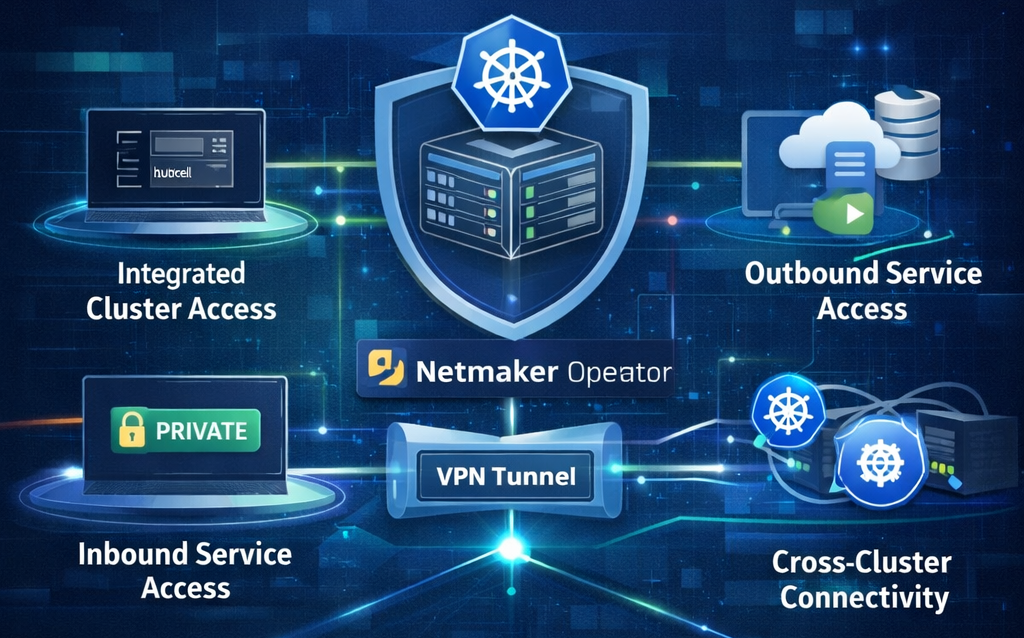
The **Netmaker Kubernetes Operator** securely connects your Kubernetes cluster to a **Netmaker WireGuard network**.
It allows:
* Kubernetes workloads to talk to **VMs, servers, and edge devices**
* Netmaker devices to securely access **Kubernetes services**
* All traffic to stay **private, encrypted, and zero-trust**
No manual VPN setup. No complex routing.
### Why Use the Netmaker Kubernetes Operator?
Modern infrastructure often spans multiple environments:
* **Kubernetes clusters** running containerised applications
* **Virtual machines** and bare-metal servers
* **Edge devices** and IoT deployments
* **Hybrid cloud** environments
Traditionally, connecting these different environments requires complex VPN configurations, firewall rules, and network routing. The Netmaker Kubernetes Operator simplifies this by:
* **Eliminating Network Complexity**: No need to manually configure VPNs or complex routing rules
* **Enabling Secure Communication**: All traffic flows through encrypted WireGuard tunnels
* **Providing Native Kubernetes Integration**: Use standard Kubernetes Services and annotations
* **Supporting Bidirectional Access**: Kubernetes workloads can reach Netmaker services, and Netmaker devices can reach Kubernetes services
### What Can You Do With the Operator?
The operator provides three main capabilities:
* **Egress Proxy**: Access Netmaker services (APIs, databases, etc.) from your Kubernetes applications using standard Kubernetes Service names
* **Ingress Proxy**: Expose your Kubernetes services to devices on your Netmaker network
* **API Proxy**: Securely access your Kubernetes API server through Netmaker tunnels with RBAC support that syncs with the users on Netmaker controlplane
## Key Concepts
### Netmaker Network
A Netmaker network is a WireGuard-based virtual network that connects devices across different locations. Devices on the network can communicate securely using private IP addresses assigned by Netmaker.
### Netclient
Netclient is the agent that runs on devices to connect them to a Netmaker network. The operator uses netclient as a sidecar container to provide WireGuard connectivity to Kubernetes pods.
### Operator
A Kubernetes operator is a controller that extends Kubernetes functionality. This operator watches for specific Kubernetes resources (like Services with annotations) and automatically configures networking to connect them with Netmaker networks.
### Cluster Egress vs Cluster Ingress
* **Egress Proxy**: Allows Kubernetes workloads to access services on the Netmaker network (Kubernetes → Netmaker)
* **Ingress Proxy**: Allows Netmaker devices to access services running in Kubernetes (Netmaker → Kubernetes)
## 🧩 Common Use Cases
* Cross-Environment Database Access: Connect your Kubernetes applications to databases running on servers in your Netmaker network, without exposing them to the public internet.
* Multi-Cluster Communication: Enable secure communication between workloads in different Kubernetes clusters through a shared Netmaker network.
* Edge-to-Cloud Connectivity: Connect edge devices and IoT devices in your Netmaker network to services running in your Kubernetes cluster.
* Secure API Access: Allow remote developers and systems to securely access your Kubernetes API server through WireGuard tunnels.
* Hybrid Cloud Networking: Unify networking across cloud and on-premises infrastructure through a single Netmaker network.
## Getting Started
### Prerequisites
{% stepper %}
{% step %}
### Kubernetes Cluster
* Kubernetes v1.11.3 or later
* Access via `kubectl`
* Sufficient permissions to create namespaces, deployments, and services
{% endstep %}
{% step %}
### Netmaker Server
* Running and accessible
* At least one network is configured
* Admin access to generate tokens
{% endstep %}
{% step %}
### Netmaker Network Token
* Generated from your Netmaker server
* Used to join the Kubernetes cluster to the network
* Keep this secure – you'll need it during installation
{% endstep %}
{% step %}
### Helm
* Helm v3.0 or later (recommended installation method)
{% endstep %}
{% endstepper %}
### Installation
#### Add Helm Repository
{% code title="Add Helm repo" %}
```bash
helm repo add netmaker-k8s-ops https://downloads.netmaker.io/charts/
helm repo update
```
{% endcode %}
#### Install the Operator
{% code title="Helm install" %}
```bash
helm install netmaker-k8s-ops netmaker-k8s-ops/netmaker-k8s-ops \
--namespace netmaker-k8s-ops-system \
--create-namespace \
--set image.repository=gravitl/netmaker-k8s-ops \
--set image.tag=latest \
--set netclient.token="YOUR_NETMAKER_TOKEN_HERE"
```
{% endcode %}
**With K8s Proxy configuration** (need netmaker API integration in auth mode for users sync):
**Auth MODE ( netmaker Pro server needed)**
```bash
helm install netmaker-k8s-ops netmaker-k8s-ops/netmaker-k8s-ops \
--namespace netmaker-k8s-ops-system \
--create-namespace \
--set image.repository=gravitl/netmaker-k8s-ops \
--set image.tag=latest \
--set netclient.token="YOUR_NETMAKER_TOKEN_HERE" \
--set manager.configMap.proxyMode="auth" \
--set service.proxy.enabled=true \
--set api.enabled=true \
--set api.serverDomain="api.example.com" \
--set api.token="your-api-token-here" \
--set api.syncInterval="10"
```
**NOAUTH MODE**
```bash
helm install netmaker-k8s-ops netmaker-k8s-ops/netmaker-k8s-ops \
--namespace netmaker-k8s-ops-system \
--create-namespace \
--set image.repository=gravitl/netmaker-k8s-ops \
--set image.tag=latest \
--set netclient.token="YOUR_NETMAKER_TOKEN_HERE" \
--set manager.configMap.proxyMode="noauth" \
--set service.proxy.enabled=true
```
{% hint style="info" %}
Using a Kubernetes Secret for the netclient token is recommended for production. Secrets are read from the operator namespace (`netmaker-k8s-ops-system`) by default.
{% endhint %}
#### Using Kubernetes Secret for token (recommended)
{% code title="Create token secret" %}
```bash
# Create secret
kubectl create secret generic netclient-token \
--from-literal=token="YOUR_NETMAKER_TOKEN_HERE" \
--namespace netmaker-k8s-ops-system
```
{% endcode %}
## Examples
### Cluster Egress
Expose services that are external to your Kubernetes cluster but available in your Netmaker network, making them accessible to your Kubernetes workloads.
Use Case: Allow Kubernetes applications to access Netmaker services (APIs, databases, etc.) using standard Kubernetes Service names.
{% code title="Cluster Egress Service example" %}
```yaml
apiVersion: v1
kind: Service
metadata:
name: netmaker-api-egress
namespace: default
annotations:
# Enable egress proxy functionality
netmaker.io/egress: "enabled"
# Option 1: Use Netmaker device IP address
netmaker.io/egress-target-ip: "100.93.135.2"
# Option 2: Use Netmaker device DNS name (uncomment to use DNS instead)
# netmaker.io/egress-target-dns: "api.netmaker.internal"
# Optional: Custom secret configuration for netclient token
# Note: Secrets are always read from operator namespace (netmaker-k8s-ops-system) for security
# netmaker.io/secret-name: "custom-netclient-token" # Default: netclient-token
# netmaker.io/secret-key: "token" # Default: token
spec:
ports:
- name: http
port: 8082
targetPort: 8082 # This is the port on the Netmaker device (standard Kubernetes way)
protocol: TCP
# Note: The selector is optional - the controller manages endpoints directly
# But including it helps with Service discovery
selector:
app: netmaker-egress-proxy
service-name: netmaker-api-egress
type: ClusterIP
```
{% endcode %}
### Cluster Ingress
Expose Kubernetes services to devices on your Netmaker network, allowing Netmaker devices to access Kubernetes workloads.
Use Case: Enable Netmaker network devices to access Kubernetes services (APIs, databases, web apps) using Netmaker IPs or DNS names.
{% code title="Cluster Ingress Service example" %}
```yaml
# Example: Expose Kubernetes Service to Netmaker Network
# This Service creates an ingress proxy that allows Netmaker devices to access your K8s service
apiVersion: v1
kind: Service
metadata:
name: my-api-ingress
namespace: default
annotations:
# Enable ingress proxy functionality
netmaker.io/ingress: "enabled"
# Optional: Specify DNS name for this service on Netmaker network
# netmaker.io/ingress-dns-name: "api.k8s.netmaker.internal"
# Optional: Custom secret configuration for netclient token
# Note: Secrets are always read from operator namespace (netmaker-k8s-ops-system) for security
# netmaker.io/secret-name: "custom-netclient-token" # Default: netclient-token
# netmaker.io/secret-key: "token" # Default: token
spec:
ports:
- name: http
port: 80
targetPort: 8080 # Port your application listens on
protocol: TCP
selector:
app: my-api # Your application selector
type: ClusterIP
```
{% endcode %}
---
# Agent Instructions
This documentation is published with GitBook. GitBook is the documentation platform designed so that both humans and AI agents can read, navigate, and reason over technical content effectively. Learn more at gitbook.com.
## Querying This Documentation
If you need additional information that is not directly available in this page, you can query the documentation by asking a question.
Perform an HTTP GET request on the following URL with the `ask` and `goal` query parameters:
```
GET https://learn.netmaker.io/kubernetes-operator.md?ask=&goal=
```
`ask` is the immediate question: it should be specific, self-contained, and written in natural language.
`goal` is what the user is ultimately trying to achieve, the reason they need the answer. Sharing it helps GitBook give you a better, more relevant answer. A goal is most helpful when it describes the outcome the user wants rather than restating the question. For example, with `ask=how do I create an API token`, a goal like `automate deployments from our CI pipeline` lets GitBook tailor the answer to that use case.
The response will contain a direct answer to the question and relevant excerpts and sources from the documentation.
Use this mechanism when the answer is not explicitly present in the current page, you need clarification or additional context, or you want to retrieve related documentation sections.