> For the complete documentation index, see [llms.txt](https://learn.netmaker.io/llms.txt). Markdown versions of documentation pages are available by appending `.md` to page URLs; this page is available as [Markdown](https://learn.netmaker.io/getting-started/about/client-types.md).

# Client Types

## Netmaker Clients

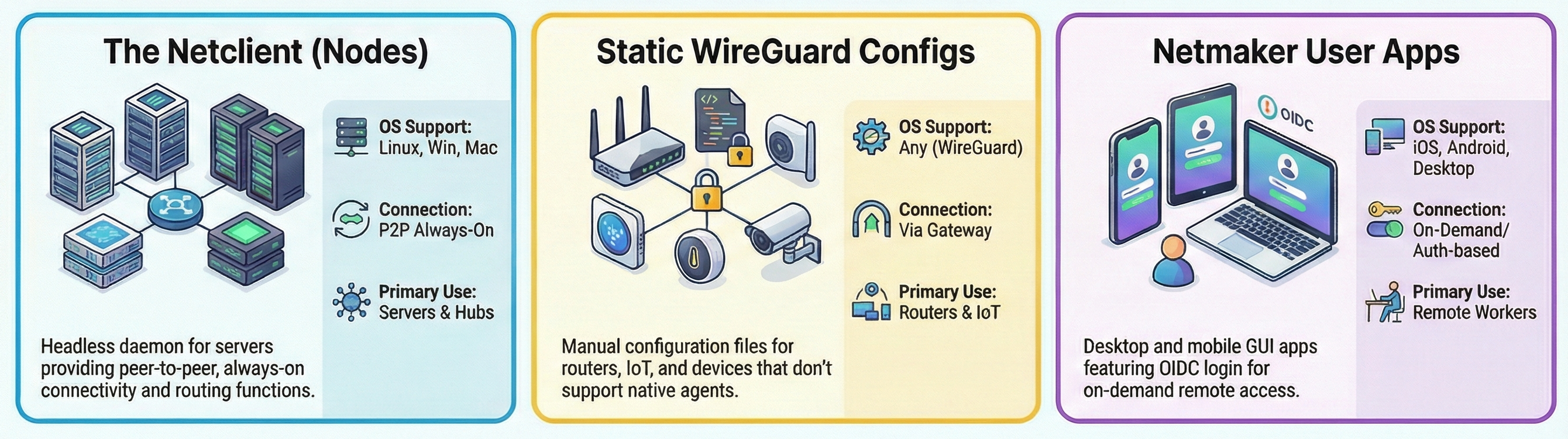
Netmaker has three primary ways to add devices and users to the VPN. Each has specific uses depending on the networking scenario and target devices.

<figure><img src="/files/ZhUPOQiaTZzQFuiGs8Ic" alt=""><figcaption></figcaption></figure>

|                                                                                                                                                                                                                                                                                                                                                                                                                                                                                                                          |                                                                                                                                                                                                                                                                                                                                                                                                                                                                                                   |                                                                                                                                                                                                                                                                                                                                                                                                                                                                                                     |
| ------------------------------------------------------------------------------------------------------------------------------------------------------------------------------------------------------------------------------------------------------------------------------------------------------------------------------------------------------------------------------------------------------------------------------------------------------------------------------------------------------------------------ | ------------------------------------------------------------------------------------------------------------------------------------------------------------------------------------------------------------------------------------------------------------------------------------------------------------------------------------------------------------------------------------------------------------------------------------------------------------------------------------------------- | --------------------------------------------------------------------------------------------------------------------------------------------------------------------------------------------------------------------------------------------------------------------------------------------------------------------------------------------------------------------------------------------------------------------------------------------------------------------------------------------------- |
| <p><strong>Server Agent:</strong><br><strong>Netclient</strong></p>                                                                                                                                                                                                                                                                                                                                                                                                                                                      | **On-Demand User Access: Netmaker Desktop / Mobile**                                                                                                                                                                                                                                                                                                                                                                                                                                              | <p><strong>Always-On Static Config:</strong><br><strong>WireGuard Client</strong></p>                                                                                                                                                                                                                                                                                                                                                                                                               |
| The [Netclient](broken://pages/6dd8b1ec772bcf61316d4351aec1318ab175831e) is meant to run on Linux and Windows servers that act as managed endpoints in the VPN. Servers added via the Netclient appear as **Nodes** in your dashboard, and can be configured as **gateways** to route endpoint traffic, such as Remote Access Gateways, Egress Gateway, and Relays. The netclient is an active, headless agent that runs in the background on devices, by default creating a peer-to-peer network with other netclients. | The [Netmaker Desktop and Mobile Apps](https://www.netmaker.io/download) are provided to users so they can log into the VPN from their devices (workstation, phone). Your server can be set up with either basic auth or any OIDC-compliant auth provider like Google or Azure AD, so users can log in with their credentials. After logging in, users have on-demand access to the VPN, selecting which networks they will connect to. This is how Netmaker provides **remote access** to users. | [Static WireGuard VPN config files](https://www.wireguard.com/) can be generated and customized on **Remote Access Gateways** within Netmaker. These files can be run on any device which supports WireGuard, and are typically used to integrate non-native devices such as routers and IoT devices. For access to and from sites, additional IP ranges can be added to these config files. These files can also be used to configure “always on” VPNs on user devices, managed by administrators. |

<table><thead><tr><th width="124.984375"></th><th width="207"></th><th></th><th></th></tr></thead><tbody><tr><td></td><td><strong>Netclient</strong></td><td><strong>Static WireGuard</strong></td><td><strong>User Apps</strong></td></tr><tr><td>Format</td><td>Headless Daemon</td><td>WireGuard Config File</td><td>GUI App for Desktop, Mobile</td></tr><tr><td>OS Support</td><td>Linux, Windows, Mac</td><td><a href="https://www.wireguard.com/install/">Many</a></td><td>Linux, Windows, Mac, iOS, Android</td></tr><tr><td>Connectivity</td><td><ul><li>Peer-to-Peer</li><li>Always-On</li></ul></td><td><ul><li>Via Gateway (Hub-And -Spoke)</li><li>Always-On</li></ul></td><td><ul><li>Via Gateway (Hub-And -Spoke)</li><li>On Demand or Always-On</li></ul></td></tr><tr><td>Capabilities</td><td><ul><li>Act as Hub for other Clients</li><li>Forward traffic to external envs</li></ul></td><td><ul><li>Can be used with many routers to support Site-to-Site</li><li>Deployable on any device that supports WireGuard.</li></ul></td><td><ul><li>User auth-based login</li><li>Session Expiry</li><li>GUI for Ease of Use.</li></ul></td></tr></tbody></table>


---

# Agent Instructions
This documentation is published with GitBook. GitBook is the documentation platform designed so that both humans and AI agents can read, navigate, and reason over technical content effectively. Learn more at gitbook.com.

## Querying This Documentation
If you need additional information that is not directly available in this page, you can query the documentation dynamically by asking a question.

Perform an HTTP GET request on the current page URL with the `ask` query parameter:

```
GET https://learn.netmaker.io/getting-started/about/client-types.md?ask=<question>
```

The question should be specific, self-contained, and written in natural language.
The response will contain a direct answer to the question and relevant excerpts and sources from the documentation.

Use this mechanism when the answer is not explicitly present in the current page, you need clarification or additional context, or you want to retrieve related documentation sections.
